SaveKeeper: getting started
SaveKeeper makes Big Ambitions saves easier to understand, manage, protect and recover. It lives in the main menu and the Load Game screen, and it works with the saves you already have.
What it does
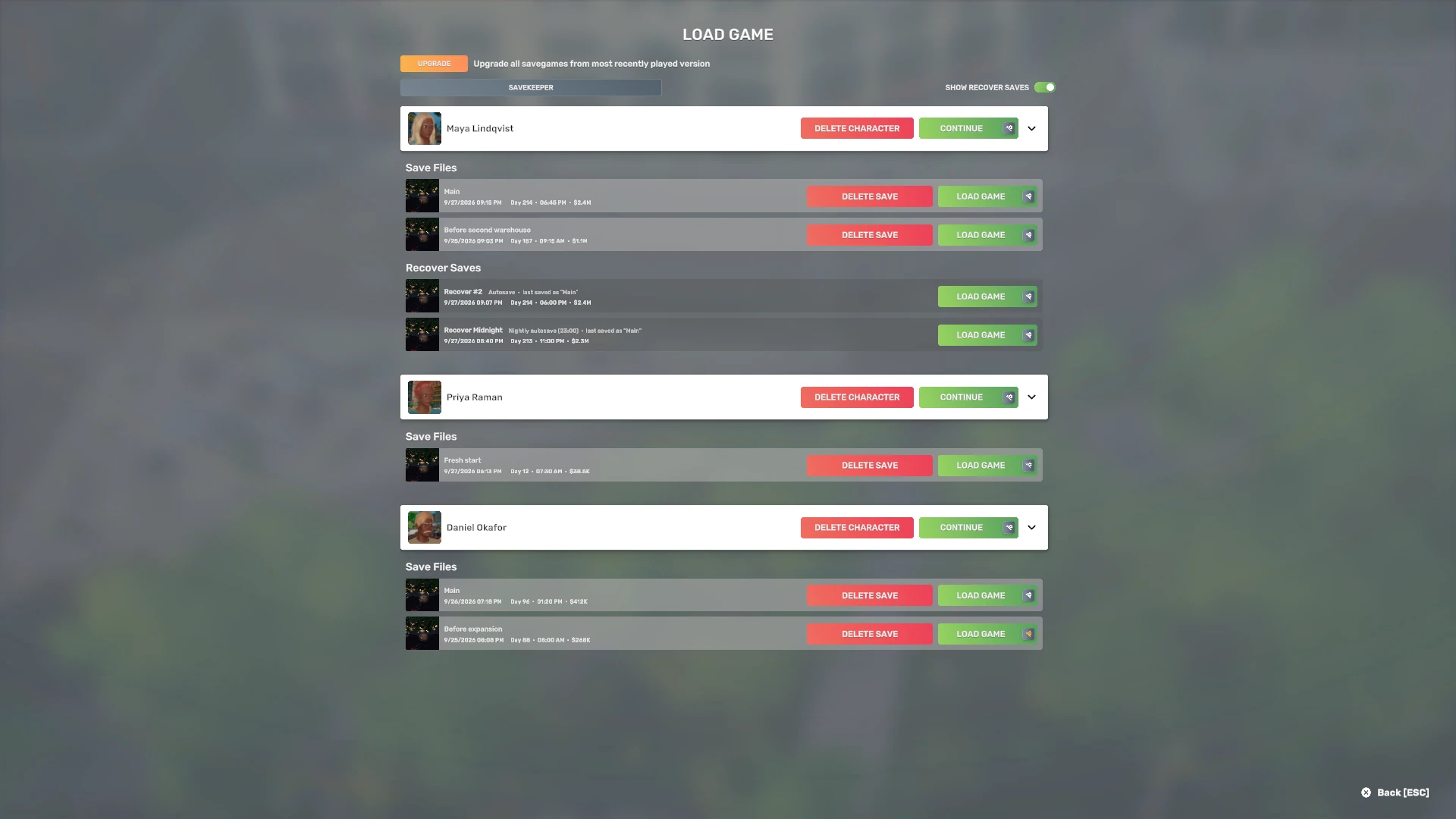
- More save information. Every save row in Load Game shows the in-game Day, time and cash, autosaves are clearly labelled, and the game's mod tooltip says which mods differ from now.
- Better control. Each save has an Actions window: back it up to a ZIP file, duplicate it, keep an autosave as a normal save, check the file, or move it to the Trash.
- Safer progress. Deleting a save or a character in the game moves it to SaveKeeper Trash instead of removing it. SaveKeeper keeps a snapshot of each save as you load it, and offers a complete safety backup of your save files before each new SaveKeeper version manages them.
Your existing saves, straight away
Available immediately: information about your existing saves
The Day, in-game time, cash, autosave labels and mod details are read from the save files Big Ambitions has already written. Every save you already have shows them the first time you open Load Game with SaveKeeper installed. SaveKeeper does not need to have created, loaded or seen a save before.
Begins after installation: SaveKeeper's own protection history
The Trash, snapshots and backups only exist from the moment SaveKeeper is running. A save you deleted before installing it is not in the Trash, and a save you have not loaded since has no snapshot yet. The version safety backup, offered the first time, is how you get a complete copy of everything you have right now.
Where SaveKeeper appears
SaveKeeper runs in the main menu only. It is not a gameplay mod: it is never added to a save's mod list, and it does not change anything while you play.
- Load Game. The extra details on every save row, and a SaveKeeper button at the top of the list that opens the SaveKeeper panel.
- The game's own buttons. Delete save, Delete character and Load go through SaveKeeper, so a delete becomes a move to the Trash and a save is checked and kept as a snapshot when you load it.
- SaveKeeper windows. Its own questions and confirmations, marked with a green SaveKeeper label so you always know which mod is asking.
SaveKeeper starts a few seconds after the main menu appears (between about 4.7 and 6 seconds in our testing). Anything you do in that first moment is handled by the game on its own, exactly as it would be without SaveKeeper. Once the SaveKeeper button shows in Load Game, it is running.
The first time you start the game
SaveKeeper asks one question before it manages any save: Create a safety backup before SaveKeeper begins? It offers a complete, verified ZIP of your whole SaveGames folder, as a recovery point from before SaveKeeper was involved. You can create it, choose where it goes, answer later, or skip it for this version. Version safety backup explains each choice.
Until you answer, the extra save information still shows, and the game works as normal, but SaveKeeper does not move, delete, copy or restore any save.
Nothing leaves your computer
SaveKeeper has no network code. Your saves, the Trash, snapshots, backups and SaveKeeper's log stay on your computer. Nothing is sent to BitFlipMods or anywhere else by using the mod; the only way anything reaches us is if you choose to attach it to a support ticket yourself.
Where to go next
- More save information: what each part of a save row means.
- The SaveKeeper panel: the five tabs.
- Trash and deleting: getting a deleted save back.
- Steam Cloud and more than one computer: what follows you between PCs and what does not.
- Known limitations: what SaveKeeper 0.1.0 does not do.