More save information
SaveKeeper adds the details you need to tell saves apart to every row in Load Game, including saves made long before you installed it.
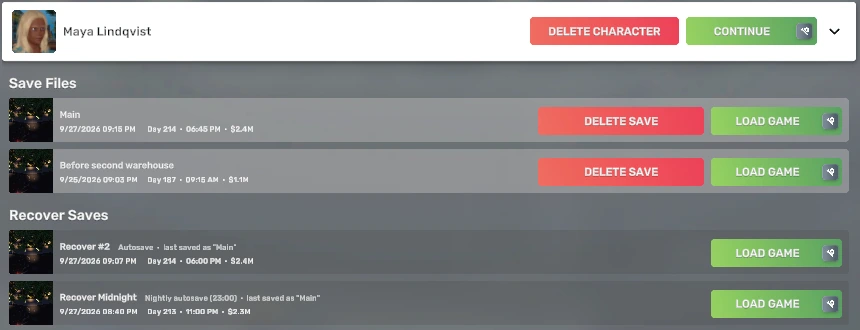
On every save row
| Detail | What it tells you |
|---|---|
| Day | The in-game day the save was made on. |
| In-game time | The time of day inside the game when it was saved, in the game's own clock format. |
| Cash | Your cash at that moment, in the game's own short format so it fits: $38.5K, $412K, $2.4M. |
These are read from the save files Big Ambitions has already written, so they appear for every save you have, the first time you open Load Game. SaveKeeper does not need to have created or loaded a save, and reading them does not change the save. Hover the details for a tooltip that spells them out in full.
If a detail cannot be read from a particular save, SaveKeeper says so on that row ("Time and cash couldn't be read from this save.") rather than guessing. A save whose name is empty is shown as (unnamed save).
Autosaves you can tell apart
The game lists its recover saves (autosaves) under their own heading. SaveKeeper labels each one:
- Autosave: a regular autosave the game made while you played.
- Nightly autosave (23:00): the game's nightly autosave, the one it names Recover Midnight.
- last saved as "Main": the name of the save you were playing when the autosave was made, so you know which game it belongs to.
To turn an autosave into an ordinary save that autosaving can never replace, use Keep this autosave.
Mod details in the game's tooltip
Big Ambitions marks a save made with mods with a small icon on its Load button, and hovering it lists those mods. SaveKeeper adds a few lines underneath comparing that list with the mods you have enabled now.
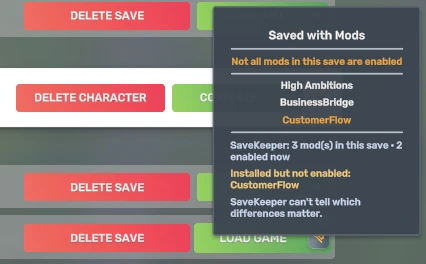
The lines you may see:
- SaveKeeper: N mod(s) in this save · N enabled now
- Installed but not enabled: a mod the save used that you still have but have switched off.
- Not installed: a Workshop mod the save used that is not on your computer now.
- Local mod not found: a mod the save used from a local mods folder that is no longer there.
- Enabled now, not in this save: gameplay mods you have now that the save was not made with.
- Same mods as when this save was made.
Short lists are named; longer ones are counted, so the tooltip stays readable. SaveKeeper only compares gameplay mods, the kind the game records in a save; menu-only mods such as SaveKeeper itself are never part of a save's mod list.
The last line, SaveKeeper can't tell which differences matter, is deliberate. Some mod changes are harmless and some are not, and SaveKeeper does not know which. It shows you the difference; whether it matters is up to the mods involved.