SaveKeeper Released
More Save Info. Better Control. Safer Progress.
Makes Big Ambitions saves easier to understand, manage, protect and recover: more information on every save, a Trash instead of instant deletion, snapshots and verified ZIP backups.
SaveKeeper makes Big Ambitions saves easier to understand, manage, protect and recover. It works in the main menu and the Load Game screen, and it does not change what is inside your existing saves.
Your existing saves gain the extra information straight away: Day, in-game time and cash on every save row, clearer autosave labels, and more detail in the game's own mod tooltip. SaveKeeper does not need to have created or seen a save before.
Deleting a save or a character in the game moves it to SaveKeeper Trash, where you can restore it. SaveKeeper also keeps a snapshot of each save as you load it, offers a complete safety backup of your SaveGames folder before each new SaveKeeper version manages your saves, and can back up any single save to a standard ZIP file.
Nothing SaveKeeper keeps is deleted automatically. The same mod build runs on Windows and macOS.
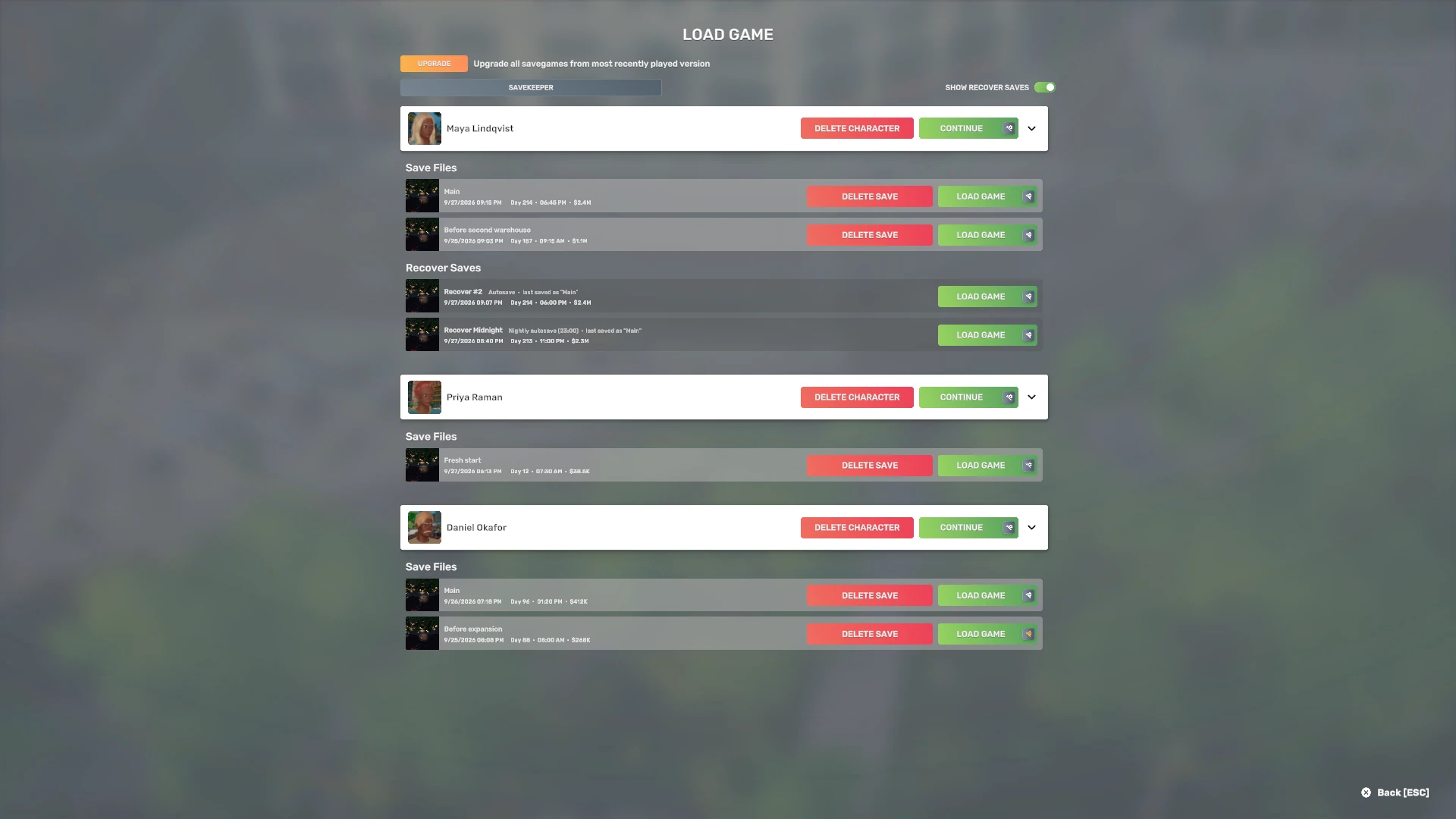
More save info
Every save row in Load Game shows the in-game Day, the time of day and your cash, in the game's own compact format. Autosaves are labelled, including the nightly one, with the save they belong to, and the game's mod tooltip gains a short comparison with the mods you have enabled now.
This is read from the saves Big Ambitions has already written, so your existing saves show it straight away. SaveKeeper does not need to have created or seen a save first.
Better control
The SaveKeeper panel, opened from Load Game, gives every save an Actions window:
- Back up to a ZIP file, verified, and restore it later as a new save.
- Duplicate a save under a new name.
- Keep this autosave as a normal save, so autosaving can't replace it.
- Check this save file, Show in folder, Show snapshots and Move to Trash.
Restores never overwrite an existing save: if a name is taken, Restore as asks for another.
Safer progress
- Trash. The game's Delete save and Delete character buttons move to SaveKeeper Trash instead of deleting. Restore, restore under a new name, or delete permanently yourself.
- Snapshots. Each save is kept as it was when you loaded it, one copy per distinct version, and can be restored as a new save.
- Version safety backup. Before each new SaveKeeper version manages your saves, it offers one complete ZIP of your whole SaveGames folder, verified before it counts.
- Checked copies. SaveKeeper finishes writing and checking its copies before it removes anything.
- Nothing deleted behind your back. The Trash, snapshots and backups are never removed automatically.
Good to know
- SaveKeeper runs in the main menu only. It is not a gameplay mod and never appears in a save's mod list.
- One build for Windows and macOS (validated on Windows and native Apple Silicon), for Big Ambitions build 3682. No other mods are required.
- It starts a few seconds after the main menu appears, and it protects the game's own buttons, not other mods or programs that delete files directly.
- The Trash, snapshots and backups are kept on the computer where they were made; Steam Cloud syncs the game's saves, not SaveKeeper's copies.
- SaveKeeper has no network code: nothing is sent anywhere by using it.
The help covers the safety backup, Trash, Steam Cloud on more than one computer, removing SaveKeeper and its known limitations.
Release notes
0.1.0
The first release.
- Day, in-game time and cash on every save row, clearer autosave labels, and mod differences in the game's mod tooltip.
- SaveKeeper Trash for the game's save and character deletes, with Restore and Restore as.
- Snapshots of each save as it was loaded, with Restore as new save.
- Verified ZIP backups of single saves, restored to an unused name.
- A version safety backup of your whole SaveGames folder, with a choosable backup location.
- Save actions: Duplicate, Keep this autosave, Check this save file, Show in folder.
- A check before loading that catches an empty, incomplete or damaged save file.
- One build for Windows and macOS.
Support
If SaveKeeper is misbehaving, open a ticket. No account is needed, and nothing you send is published.